> For the complete documentation index, see [llms.txt](https://docs.labii.com/llms.txt). Markdown versions of documentation pages are available by appending `.md` to page URLs; this page is available as [Markdown](https://docs.labii.com/widgets/section-widgets/biology/assay/elisa-standard-curve.md).
# ELISA Standard Curve
Perform standard curve analysis and concentration prediction for ELISA data directly within your ELN
## Specs
| Label | Value |
| ------------------------- | ----------------------------- |
| **Version** | 2.2.0 (updated on 2026-04-10) |
| **Developer** | Labii Inc. |
| **Type** | Section |
| **Support Configuration** | Yes |
## Overview
[ELISA](https://www.thermofisher.com/us/en/home/life-science/protein-biology/protein-biology-learning-center/protein-biology-resource-library/pierce-protein-methods/overview-elisa.html) (enzyme-linked immunosorbent assay) is a plate-based assay technique designed for detecting and quantifying substances such as peptides, proteins, antibodies, and hormones. Traditionally, ELISA data analysis requires multiple external tools — Excel for data preparation and GraphPad for curve fitting — which can take hours per experiment. Labii's **ELISA Standard Curve** widget consolidates plate layout design, raw data entry, standard curve fitting, and concentration prediction into a single ELN workflow, eliminating the need for third-party software. With just a few clicks, you can fit standard curves using multiple regression methods and automatically calculate sample concentrations with associated statistics.
## Use Cases
* **Protein Quantification** — Determine the concentration of proteins, antibodies, or hormones in biological samples from a standard curve
* **Drug Development** — Quantify compound or drug concentrations in pharmacokinetic and pharmacodynamic studies
* **Immunoassay Analysis** — Measure antibody titers or cytokine levels in serum, plasma, or cell culture supernatant
* **Quality Control** — Validate assay performance by monitoring standard curve fit quality, SD, and CV across experiments
* **Compliance Workflows** — Maintain traceable, audit-ready ELISA records within a 21 CFR Part 11–compliant ELN
## Interface
### Read-only View
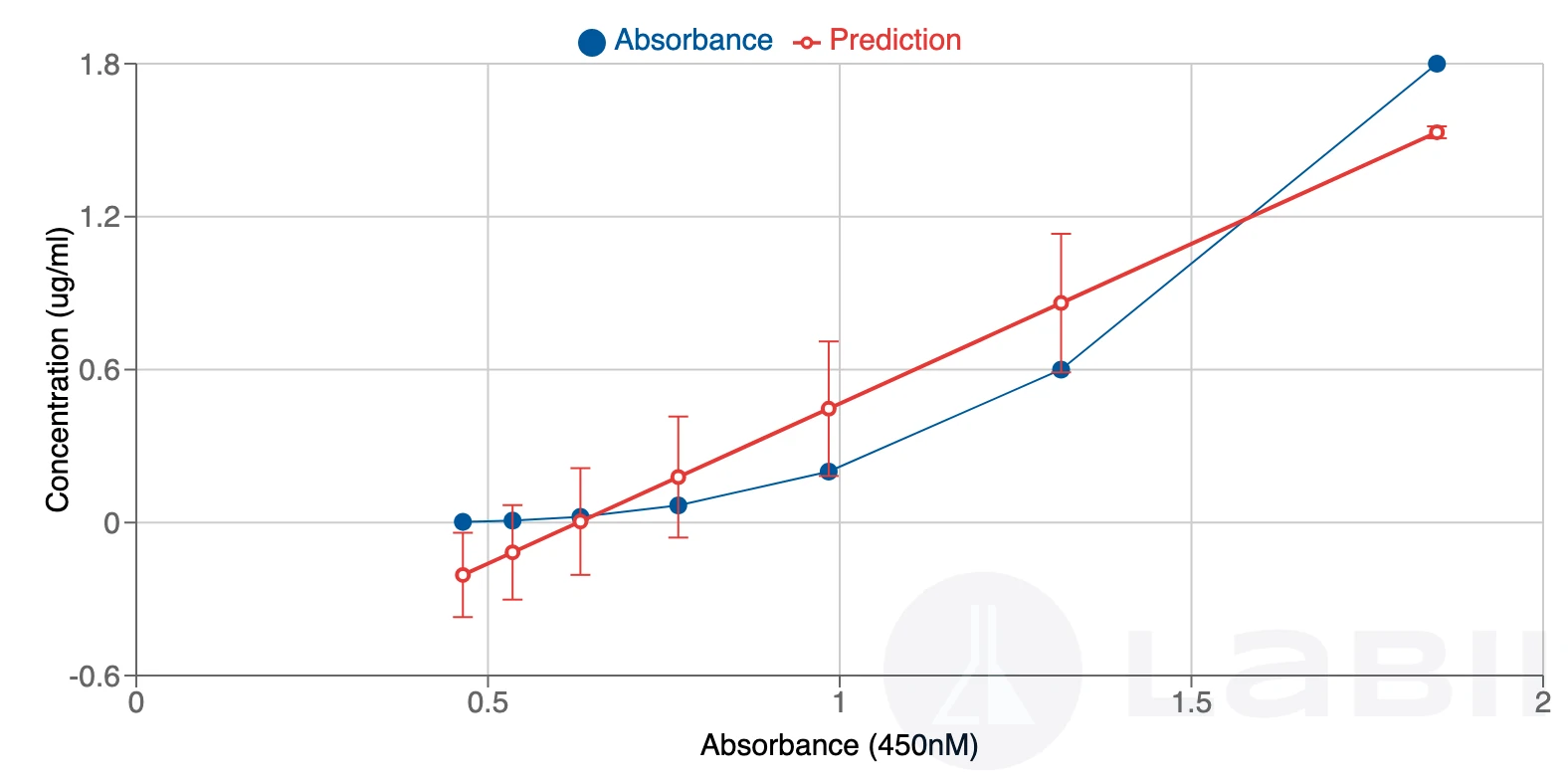
The read-only view displays the completed ELISA analysis in a structured layout. It shows the standard curve plot with the best-fit line, the fitted equation, and a sortable results table listing each sample with its average absorbance, standard deviation (SD), coefficient of variation (CV), and calculated concentration.
The read-only view displays the standard curve plot and per-sample concentration results with SD and CV
### Edit View
The edit view presents a 96-well plate interface with two input stages: **Layout** and **Data**. In the Layout stage, users define the plate map by assigning well roles (standards, blanks, samples) and placing CONC row or column labels. In the Data stage, users enter raw absorbance readings into the corresponding wells. Once both stages are complete, clicking the **Analysis** button triggers the automated analysis pipeline.
## Configuration
Click the **Edit** icon in the widget header to open the configuration panel and adjust the following settings.
### Settings
* **Concentration Unit** — Unit of concentration displayed in results and on the plot axis (e.g., `ug/ml`, `ng/ml`, `pg/ml`)
* **Optical Density (OD)** — Wavelength used for absorbance measurement. Defaults to `450 nM`
* **Dilute Factor** — Multiplier applied to calculated concentrations to account for sample dilution. Defaults to `1`
* **Data Transform** — Transformation applied to concentration values before curve fitting:
* `x` — No transformation (raw values)
* `log(x)` — Natural logarithm of concentration
* `10^x` — Antilogarithm (power of 10) of concentration
* **Fit Method** — Regression model used to fit the standard curve. Defaults to `linear`:
* **linear** — Fits to a straight line: $y = mx + c$
* **exponential** — Fits to an exponential curve: $y = ae^{bx}$
* **logarithmic** — Fits to a logarithmic curve: $y = a + b\ln x$
* **power** — Fits to a power law curve: $y = ax^b$
* **polynomial** — Fits to a polynomial curve: $y = a\_nx^n + \ldots + a\_1x + a\_0$
{% hint style="info" %}
For most standard ELISA protocols, linear regression with no data transform is sufficient. Use a logarithmic fit or `log(x)` transform for assays with a wide dynamic range.
{% endhint %}
## Additional Functions
### Prepare Layout
The widget supports 96-well plates. Define the plate map using one of three input methods:
{% stepper %}
{% step %}
Click **Edit Plate** to open the well-editor interface
{% endstep %}
{% step %}
Assign well roles using the following labels:
* **CONC** — Set as a row label or column label to define a series of standard concentrations along that row or column
* **STD** — Mark a well as a standard
* **BLANK** — Mark a well as a blank
* Any other label is treated as a sample identifier; duplicate labels are treated as replicates
* Leave a well empty to exclude it from analysis
{% endstep %}
{% step %}
Optionally, click the **edit** icon on a well to update its individual dilution factor (defaults to `1`)
{% endstep %}
{% step %}
Alternatively, paste layout values directly from Excel or Word, or drag and drop a tabular file to import the layout automatically
{% endstep %}
{% endstepper %}
{% hint style="warning" %}
**CONC** must be placed as a row label or column label — not in a data cell — to correctly define the standard concentration series along that row or column.
{% endhint %}
### Prepare Data
{% stepper %}
{% step %}
Switch to the **Data** input mode within the widget
{% endstep %}
{% step %}
Copy absorbance readings from your plate reader output and paste them into the corresponding wells, or type values manually
{% endstep %}
{% step %}
Leave any well blank to exclude that data point from the analysis
{% endstep %}
{% endstepper %}
### Perform Analysis
Click the **Analysis** button to run the full automated pipeline. The analysis completes in seconds and executes the following sequence:
1. **Average blank absorbance** — All wells marked `BLANK` are averaged to produce the background value
2. **Background subtraction** — The blank average is subtracted from every data point to produce normalized absorbance values
3. **Standard averaging** — Duplicate or triplicate standard wells at the same concentration are averaged; standard error is calculated
4. **Curve fitting** — The selected regression method and data transform are applied to the standard concentration–absorbance pairs; the fit equation is displayed
5. **Standard curve plot** — Mean absorbance (y-axis) is plotted against concentration (x-axis) with the best-fit curve overlay
6. **Concentration calculation** — Each sample's mean absorbance is back-calculated through the fit model to yield concentration, then multiplied by the dilution factor
7. **SD and CV** — Standard deviation and coefficient of variation are calculated per sample and shown in the sortable results table
{% embed url="" %}
## Best Practices
* **Run samples in replicate** — Test each standard and sample in duplicate or triplicate. A CV above 20% indicates potential pipetting errors, contamination, temperature variation, or evaporation during incubation. Use plate covers during all incubation steps.
* **Include a standard curve on every plate** — Operator technique, pipetting, incubation conditions, and temperature all vary between runs; standard curves cannot be reliably reused across plates.
* **Run a positive control** — A control sample of known concentration on each plate confirms that the ELISA was executed correctly.
* **Run blank samples** — Blanks enable accurate background subtraction and flag reagent or plate contamination when readings are unexpectedly high.
* **Dilute samples within the linear range** — Values at the extreme ends of the standard curve carry higher error. Test samples at multiple dilutions to ensure at least one falls within the linear range.
{% hint style="success" %}
For assays with a wide dynamic range, switch the **Fit Method** to `logarithmic` or `polynomial` and enable the `log(x)` **Data Transform** for a more accurate fit.
{% endhint %}
## Related Widgets
* [**ELISA Qualitative**](/widgets/section-widgets/biology/assay/elisa-qualitative.md) — Companion widget for qualitative ELISA workflows; determines the presence or absence of an analyte rather than its concentration. Use when quantitative results are not required.
* [**Dose Response Curve**](/widgets/section-widgets/biology/assay/dose-response-curve.md) — Performs dose-response analysis on 96-well plate data. Use when studying potency or inhibitory concentration (IC50) rather than standard-curve-based quantification.
## References
* [ELISA Data Analysis — ThermoFisher](https://www.thermofisher.com/us/en/home/life-science/protein-biology/protein-biology-learning-center/protein-biology-resource-library/pierce-protein-methods/overview-elisa/elisa-data-analysis.html)
* [Calculating and Evaluating ELISA Data — Abcam](https://www.abcam.com/protocols/calculating-and-evaluating-elisa-data)
* [Video Tutorial](https://youtu.be/jbk31bDamGM) — Walkthrough of the ELISA Standard Curve widget
---
# Agent Instructions
This documentation is published with GitBook. GitBook is the documentation platform designed so that both humans and AI agents can read, navigate, and reason over technical content effectively. Learn more at gitbook.com.
## Querying This Documentation
If you need additional information that is not directly available in this page, you can query the documentation by asking a question.
Perform an HTTP GET request on the following URL with the `ask` and `goal` query parameters:
```
GET https://docs.labii.com/widgets/section-widgets/biology/assay/elisa-standard-curve.md?ask=&goal=
```
`ask` is the immediate question: it should be specific, self-contained, and written in natural language.
`goal` is what the user is ultimately trying to achieve, the reason they need the answer. Sharing it helps GitBook give you a better, more relevant answer. A goal is most helpful when it describes the outcome the user wants rather than restating the question. For example, with `ask=how do I create an API token`, a goal like `automate deployments from our CI pipeline` lets GitBook tailor the answer to that use case.
The response will contain a direct answer to the question and relevant excerpts and sources from the documentation.
Use this mechanism when the answer is not explicitly present in the current page, you need clarification or additional context, or you want to retrieve related documentation sections.