Bulk Copy
Overview
Bulk Copy lets you quickly copy identifiers from multiple selected records in any table view. It supports four output formats, ideal for sharing in emails/chats, pasting into spreadsheets, or feeding downstream tools and scripts.
Once copied, Labii places the values on your system clipboard so you can paste them anywhere.
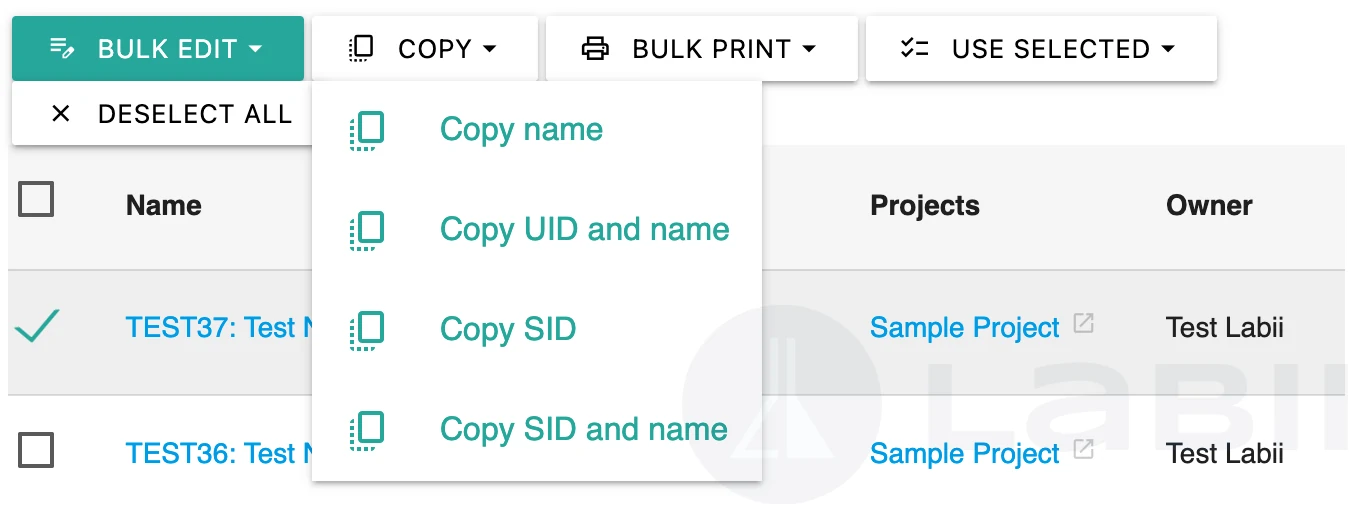
How to use
In a table list, select one or more records using the checkboxes.
Click COPY ▾ in the toolbar.
Choose one of the four copy actions (below).
- Copy name
- Copy UID and name
- Copy SID
- Copy SID and name
Paste the result where you need it.
Copy actions & output
1) Copy name
- What it copies: The record name/title only.
- Output format: Newline-separated list.
- Example (2 records):
Test Experiment
Stability – Batch A
2) Copy UID and name
- What it copies: The UID (human-readable unique code) and the name, joined by ": ".
- Output format: Newline-separated list.
- Example:
EP1: Test Experiment
EP2: Stability – Batch A
3) Copy SID
- What it copies: The SID (system ID; globally unique, non-editable).
- Output format: Newline-separated list.
- Example:
adgj0a40x43bc7chmrwBGL
7p8k2q1m4n9r0s3t5u6vWX
4) Copy SID and name
- What it copies: An array of JSON objects, each with "sid" and "name".
- Output format: A single JSON array (valid JSON).
- Example (2 records):
[
  {"sid":"adgj0a40x43bc7chmrwBGL","name":"EP1: Test Experiment"},
  {"sid":"7p8k2q1m4n9r0s3t5u6vWX","name":"EP2: Stability – Batch A"}
]
Behavior details
- Selection order: Items are copied in the same order they appear in the current table (including any active sort).
- Delimiter: One record per line for text outputs; JSON output is a single array.
- Encoding: Names are copied exactly as displayed (Unicode preserved). In JSON mode, special characters are properly escaped.
- Clipboard only: No file is created; content goes directly to your OS clipboard.
- Permissions: You can copy any record you can view; hidden columns do not affect copying.
When to use each mode
- Name: Quick human-readable lists for messages or notes.
- UID and name: Share a readable ID with context, handy for stakeholders who reference UIDs.
- SID: Precise machine-stable identifiers for API calls, imports, or support tickets.
- SID and name (JSON): Structured payloads for scripts, integrations, or bulk operations.
Tips & troubleshooting
- Pasting into spreadsheets: Use Copy name, Copy UID and name, or Copy SID and then use “Split text to columns” on ": " if needed.
- Need CSV: Paste the newline list into a sheet and export to CSV, or transform the JSON array as required.
- Nothing copied? Ensure at least one row is selected and your browser allows clipboard access.
- Large selections: Copy works for large sets; however, extremely big selections may be truncated by OS clipboard limits.
Glossary
- UID (User-readable ID): Short, readable identifier like EP1.
- SID (System ID): Long, immutable system identifier like adgj0a40x43bc7chmrwBGL.
Examples at a glance
- Names: Test Experiment
- UID + Name: EP1: Test Experiment
- SID: adgj0a40x43bc7chmrwBGL
- SID + Name (JSON): [{"sid":"adgj0a40x43bc7chmrwBGL","name":"EP1: Test Experiment"}]