Section Display By Column
Specs
| Label | Value |
|---|---|
| Version | 0.2.0 (updated on 2026-11-15) |
| Developer | Labii Inc. |
| Type | Section |
| Support Configuration | Yes |
Overview
The Section Display By Column widget displays the content of every record linked from the current record. You select one or more ForeignKey or ForeignKeys columns, and the widget shows the column groups, the sections, or both for each linked record, one after another. You can hide specific column groups or sections by name, so the current record shows only the information that matters.
This widget displays the records that the current record points to. To display the records that point to the current record, use Section Display By ForeignKey.
When the current record is signed, the widget keeps displaying the linked records as they were at the time of signing. See Signed and Read-only Records.
Use Cases
- Sample Context: Show the information and sections of all source samples inside a derived sample record.
- Experiment Review: Display the protocols, reagents, or instruments linked to an experiment without opening each record.
- Order and Receiving Workflows: Show the details of all linked accounts, orders, or shipments in a receiving record.
- Batch Records: Collect the content of all batches or lots referenced by a production record in one place.
- Focused Reports: Hide unrelated column groups or sections so reviewers see only the relevant data.
Interface
Read-only View
The widget shows each linked record in turn. Each block starts with a Showing data from link that opens the source record in a new tab, followed by the selected content.
- Columns: Displays the column groups of the linked record, such as Account Information, in a compact layout.
- Sections: Displays the sections of the linked record, such as Sample Information.
- Multiple Records: Displays every record from all selected columns. Duplicate records are shown only once.
- Live Updates: While the section is editable, changing the ForeignKey or ForeignKeys value of the current record updates the displayed records without editing the widget settings.
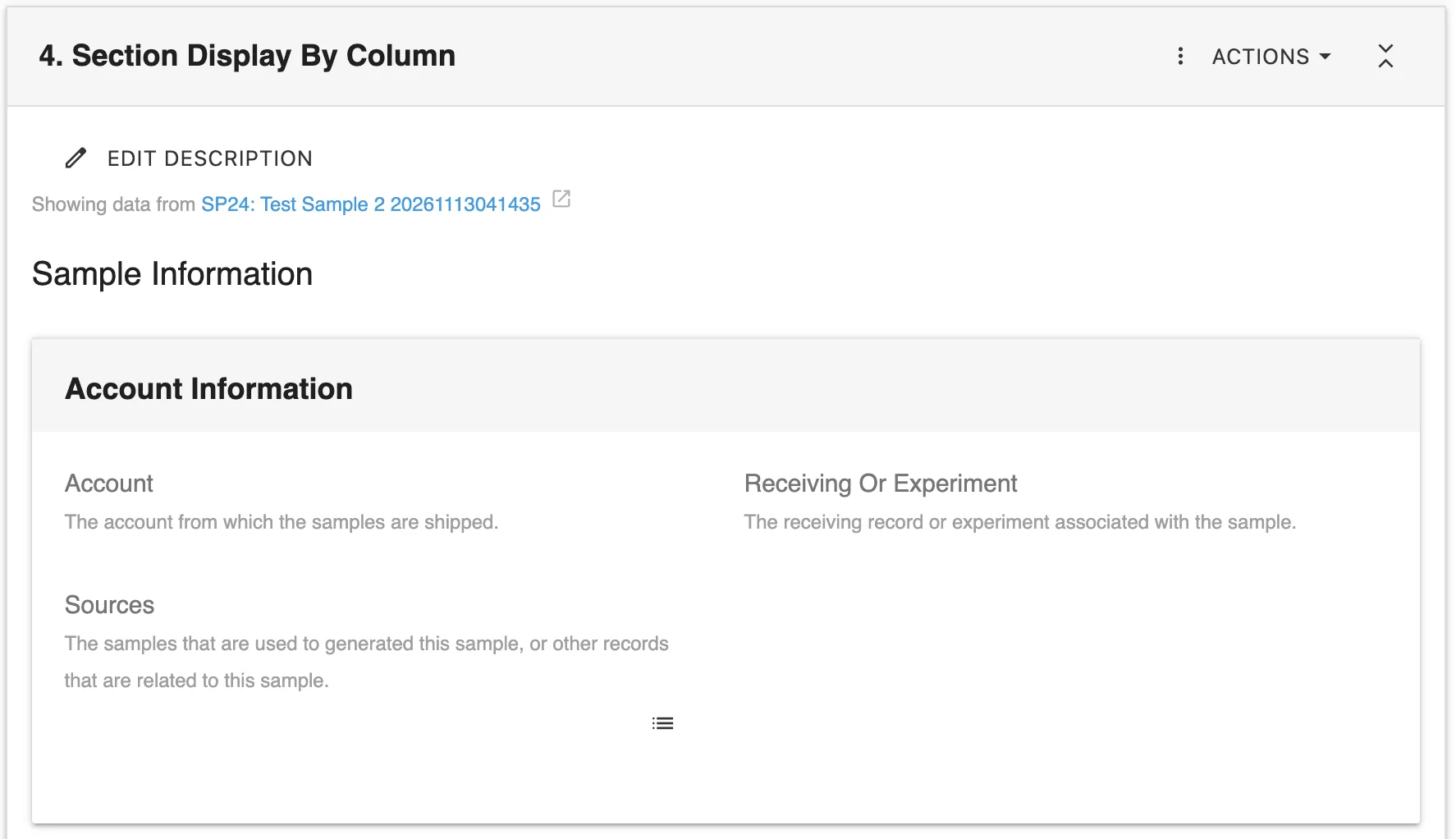
The read-only view displays the sections and column groups of the linked record SP24: Test Sample 2.
Edit View
In the edit view, you configure which columns to read, what to display, what to exclude, and whether the displayed content can be edited.
- Columns (ForeignKey or ForeignKeys): Select one or more relationship columns of the current record.
- Display: Select All columns, All sections, or both. Use Select All to choose both options.
- Exclude: Enter the names of the column groups or sections to hide, separated by
,. - Is Readonly: Choose whether the displayed content is read-only or editable.
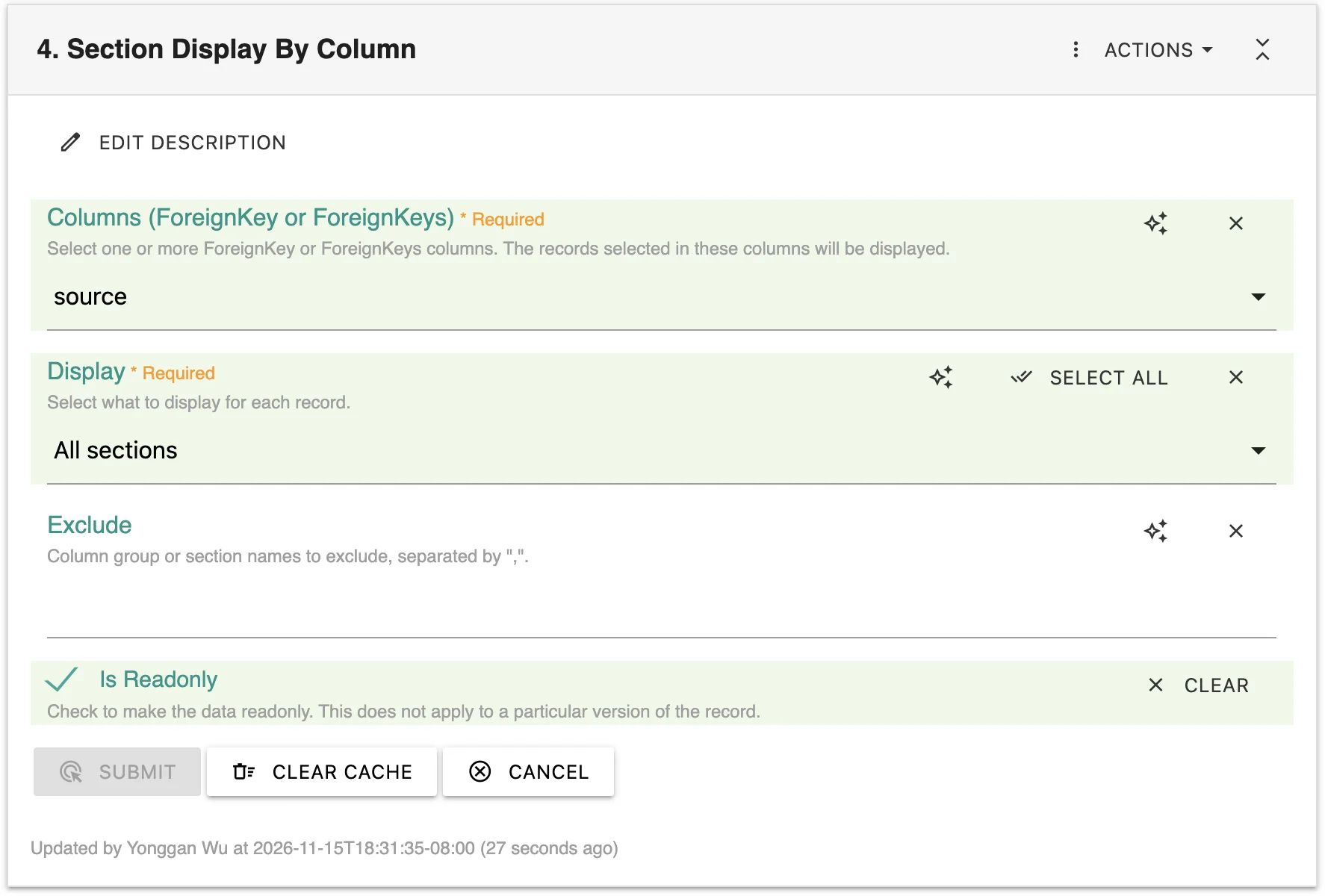
The edit view configures the source column, the content to display, the exclusions, and the read-only setting.
Configuration
Initial Setup
Open the record and add the Section Display By Column widget to a section.
Click Edit to open the widget settings.
Select one or more ForeignKey or ForeignKeys columns in Columns (ForeignKey or ForeignKeys).
Select what to display in Display, optionally enter names in Exclude, and click Submit.
Required Settings
- Columns (ForeignKey or ForeignKeys): The relationship columns of the current record. The records selected in these columns are displayed.
- Display: What to display for each linked record:
- All columns: The column groups of the linked record.
- All sections: The sections of the linked record.
Optional Settings
- Exclude: Column group or section names to hide, separated by
,. For example,Account Information, Noteshides the Account Information column group and the Notes section. Matching is not case-sensitive. - Is Readonly: Selected by default. Clear it to edit the columns and sections of the linked records directly from the current record.
When Is Readonly is cleared, changes made in this widget are saved to the linked source records, not to the current record.
Additional Functions
Signed and Read-only Records
To meet regulatory requirements, a signed record must keep showing the data it was signed with.
- While the section is editable, the widget displays the current linked records and saves the latest version of each.
- When the section is read-only, the widget displays the saved versions instead of the current linked records. A section is read-only when the record is signed or completed, when it is printed or opened as a version, or when you do not have permission to edit it.
This is different from the Is Readonly setting, which only controls whether the displayed content can be edited while the section is editable.
Sections that have not saved any versions yet display the current linked records.
Multiple Linked Records
The widget reads every selected column and displays every linked record.
- Multiple Columns: Combine records from several ForeignKey and ForeignKeys columns.
- Duplicate Removal: A record linked from more than one column is displayed once.
- Self-Reference Protection: The current record is skipped if a column points to it.
Recursion Protection
If a linked record contains a Section Display By Record, Section Display By ForeignKey, or Section Display By Column widget, that section is skipped. This prevents records that reference each other from displaying each other without end.
Integration Features
- Relationship Widget Integration: Works with ForeignKey and ForeignKeys columns to find the linked records.
- Column Group Integration: Uses the column groups defined in the table of each linked record.
- Section Integration: Displays the sections of each linked record with their own widgets.
Best Practices
Data Organization
- Organize the columns of source tables into clear column groups so you can exclude them by name.
- Use consistent section names across records of the same table so one Exclude value works for all of them.
Workflow Design
- Keep Is Readonly selected when the displayed content is for reference.
- Clear Is Readonly only when users should update the linked records from the current record.
- Open the record before signing so the widget saves the latest versions of the linked records.
- Display only All sections or only All columns when the full content of each record is too long.
Add this widget to a table template so every new record automatically shows the content of its linked records.
Common Pitfalls to Avoid
- Avoid misspelling names in Exclude, because only exact names (ignoring case) are hidden.
- Avoid linking many large records, because every linked record is loaded and displayed in full.
Related Widgets
- Section Display By ForeignKey: Display the content of the records that reference the current record.
- Section Display By Record: Display the content of a manually selected source record.
- ForeignKey: Store a single linked record that this widget can display.
- ForeignKeys: Store multiple linked records that this widget can display.